 AutoCut
Bring a few views into the same frame.
Arrange photos and videos into a grid or split-screen composition.
Available in the AutoCut iPhone app
Start with a reason to edit.
Some stories are easier to understand when the viewer sees more than one image at a time: different angles, steps or moments.
A small collection, shown together
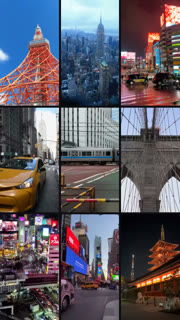
Choose related photos from one outing. Use a grid that leaves each image enough room and adjust the crop of every cell.
A coordinated collage instead of a crowded sequence.
Try this workflow with your own footage.Three steps to your version.
Select a layout
Choose a grid with the right number of media positions.
Add your media
Place a photo or video in each available section.
Adjust each frame
Check the subject and crop in every part of the grid.
One visual relationship
Use images that belong together instead of filling a grid with unrelated shots.
Readable crops
A grid cell is smaller than a full screen; choose subjects that remain visible.
More than photos
Mix stills and clips where the layout supports them.
Works well with…
 9
 5
 1
Grid Flow
Combine grid arrangements and full-frame moments in a music-driven edit.
 Fit your format
Crop & Resize
Change the composition and project ratio for the platform or presentation you need.
 Travel
 Coffee
 Fashion
Video Templates
Explore editable video templates for travel, products, fitness, celebrations and everyday moments.
Can I use Grid Maker in my browser?
The feature runs in AutoCut for iPhone. The website provides examples, template previews and instructions.
Can I review the result before sharing?
Preview the finished result in the app and use the available editing controls to check the media, timing and appearance.
Does this feature require a purchase?
Access varies by tool and subscription. Generation features may also use credits. Check the current in-app screen and purchase details before you start.